It learns. It deepens.
Your root system gets smarter every time you use it. Structured memory, compound learning, a system that remembers what matters. This is how it deepens.
👇 After this module
You understand what gets saved and where, how memory tiers work, how to teach your system every day, and how to feed it your real network.
What you'll do this week
- What actually gets saved, see how Claude turns your conversations into memory you can trust
- Your memory system, understand the working layers, the review gates, and where each piece of knowledge lives
- Teaching it more every day, learn the small habits that compound into a system that knows you
- Your fact files, fill in identity, business, preferences, and decisions in plain language
- The map and the terrain, organise your knowledge so Claude knows what to load and when
- Teaching it your network, import your LinkedIn connections and let Claude classify them by ICP fit
What you'll leave with
- A memory system that knows what to keep and what to let go
- Your fact files filled in across all four languages
- Your LinkedIn network imported and classified by fit
- A working Network tab and Relationships tab in your dashboard
- Confidence that your system remembers across sessions, not just within them
Why this matters
Memory is what turns Claude from a helpful tool into a system that knows you. Without it, every conversation starts from zero.
You do not build a complete memory system in one sitting. You start with a few facts, a few preferences, and it grows from use. Every conversation adds something. Every save makes it smarter. The system deepens because you use it, not because you filled in every field on day one.
Start here
Lesson 1: What actually gets saved →
What actually gets saved
Before we talk about memory, let's clear up something important. Your conversations with Claude are not lost when you close a session. Every conversation is saved as a file on your computer. You can go back to any past conversation, pick up where you left off, and keep working.
Conversations are saved locally
Every session you have with Claude Code gets saved as a file on your Mac. These files live in a hidden folder and they stay there indefinitely. You can browse past conversations in the sidebar, search through them, or resume any of them at any time.
To go back to a previous conversation, type /resume and pick from the list. Or type /continue to jump straight back to your most recent one. The full conversation loads back in, exactly as you left it.
Where conversations live: app vs terminal
If you use Claude on the web (claude.ai), your conversations are stored on Anthropic's servers and appear in a sidebar list. You can scroll through them, search them, and pick up where you left off.
In Claude Code (the terminal), your conversations are saved as files on your computer in a hidden folder called ~/.claude/projects/. Each session becomes a .jsonl file. They stay on your machine indefinitely. You can resume any of them with /resume or jump to your most recent with /continue.
In both cases, the conversations are processed through Anthropic's API. The difference is where the transcript file lives after the session ends.
But new sessions start fresh
Here is the important part. When you start a brand new session (not resuming an old one), Claude does not automatically know what happened in previous conversations. It does not read your old transcripts. It starts with a blank slate.
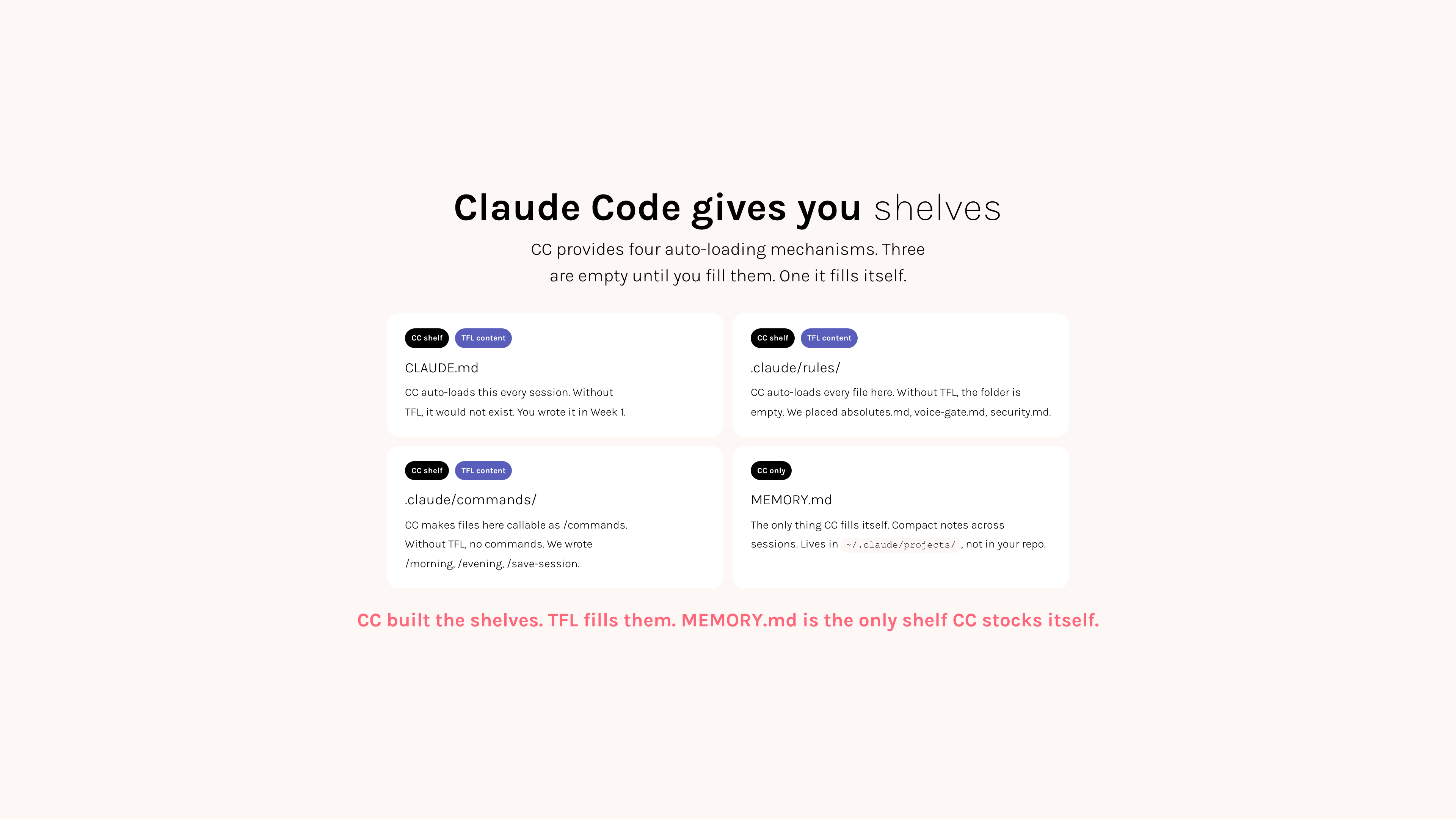
What Claude reads at the start of every new session falls into two groups: things Claude does natively (built into Claude Code itself), and things your Four Languages root system adds on top.
Claude native (built-in to Claude Code)
Those three files auto-load every single session without any action from you. Claude Code reads them before you type your first message. That is the entire automatic load.
Four Languages system (loaded by your morning protocol, not by Claude itself)
context/memory/learnings.md. Read by your /morning protocol Step 1 so Claude does not repeat past mistakes. Only loads if you actually run /morning to start your session.
context/memory/patterns.md. Observations about how you actually work. Scanned by your /morning protocol Step 1, alongside learnings.
context/memory/fact/ are NOT loaded automatically. They load only when a skill or task references them, or when Claude hits the strategic thinking trigger (any "what should I do about" question). This keeps your context window light.
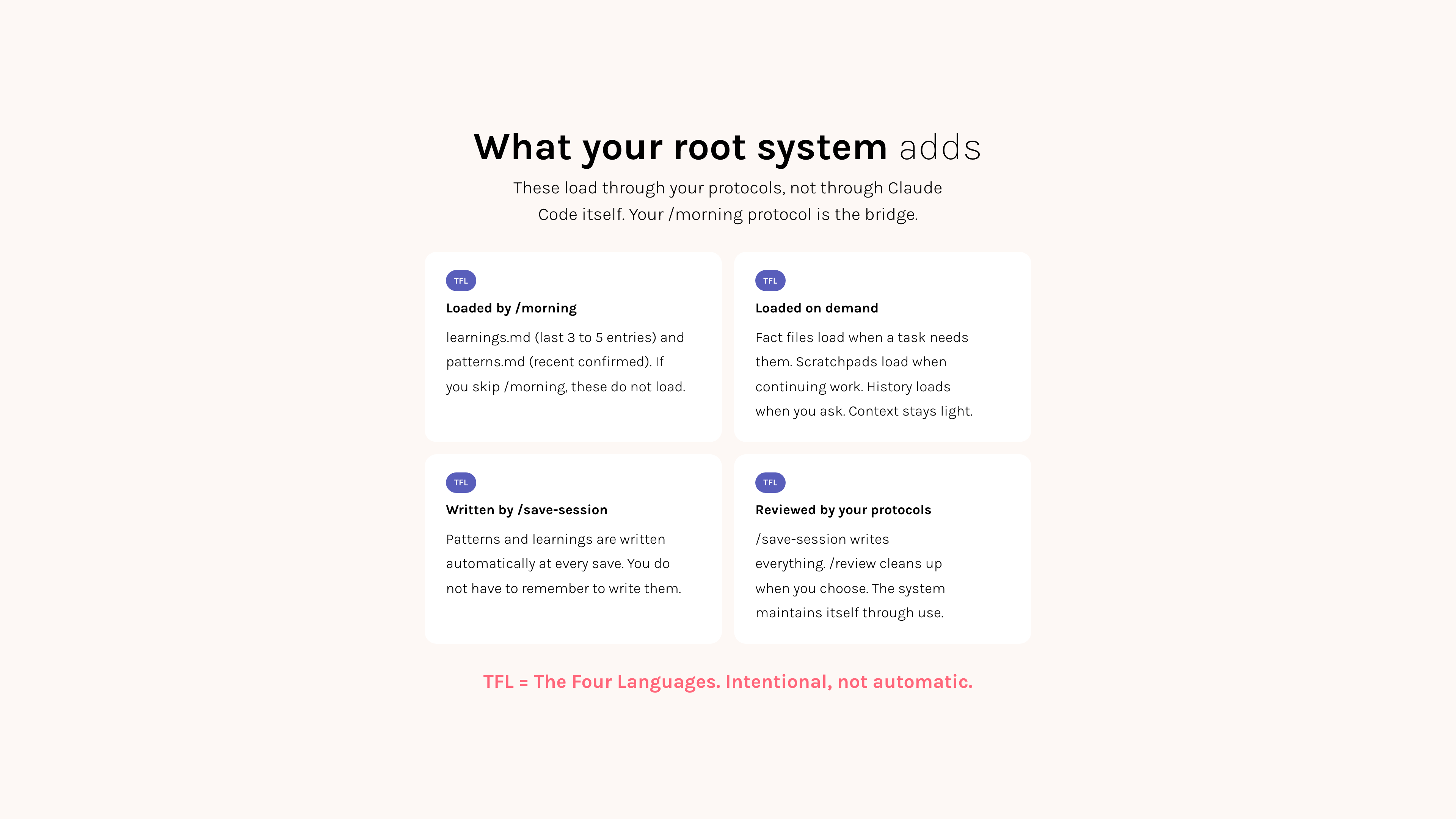
The morning protocol is the bridge between Claude Code's small native auto-load and your full Four Languages memory. If you skip /morning and just start typing, Claude only has CLAUDE.md, MEMORY.md, and rules to work from. That is why /morning matters: it pulls in the recent context from your last few sessions so Claude walks in knowing where you left off.
Zero conversation history loads from prior sessions on its own. Skills, content folders, and history all load on demand when the task requires them.
Watch: save before it compacts
During a long session, Claude compresses older messages to free up space. If you have unsaved work, it can get lost in the compression. This is why the save habit matters: save before context runs low.
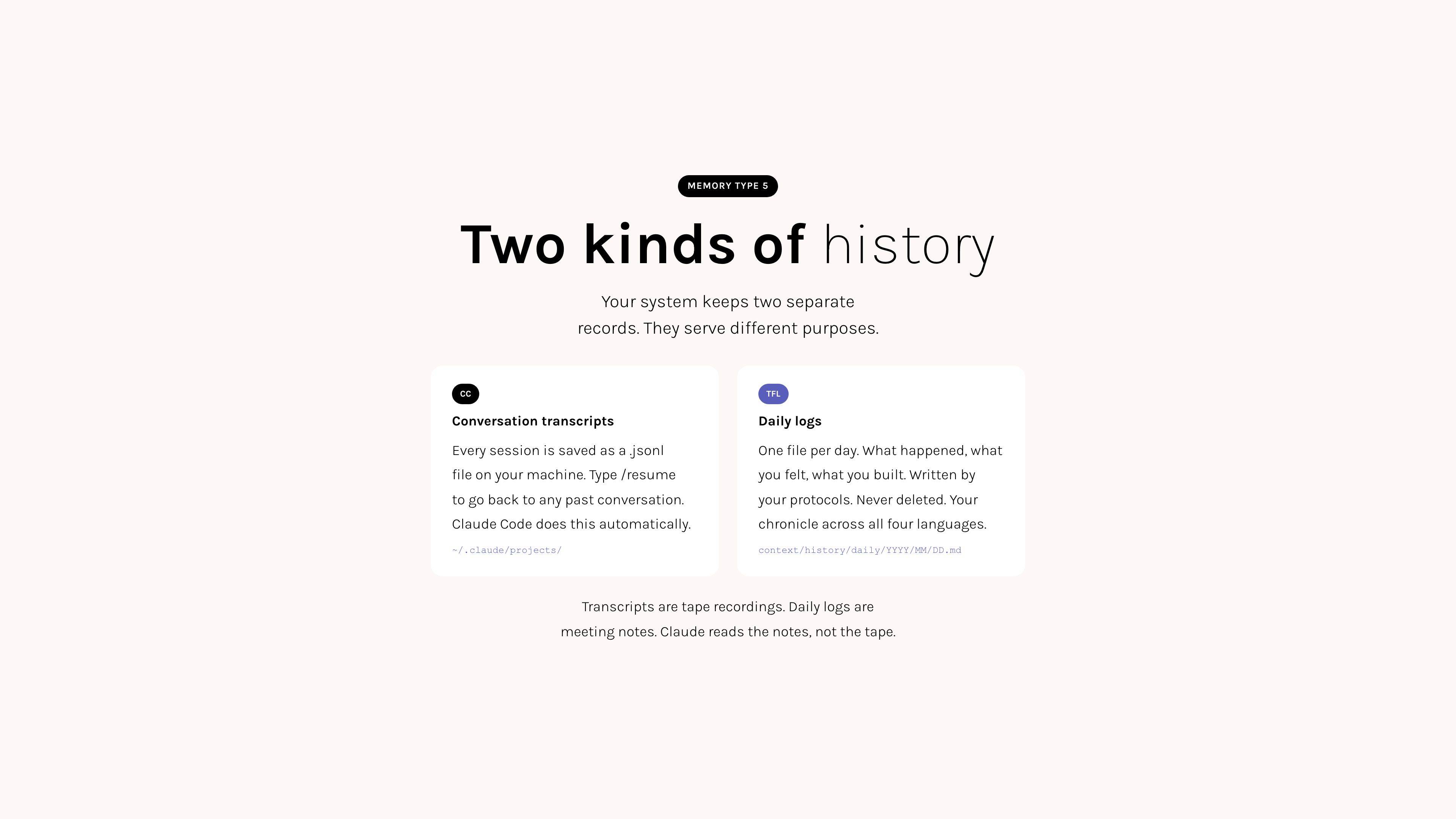
The difference that matters
Think of it this way. Your conversation transcripts are a tape recording of a meeting. Saved on your machine, playable anytime. Your root system files (CLAUDE.md, memory, fact files) are the meeting notes you bring to the next meeting. The tape recording exists, but Claude only reads the notes.
This is why your root system matters so much. Without it, you could resume old conversations, but every new session would start from zero. With it, Claude walks into every session already knowing who you are, what you are working on, and how you like things done.
What you build over time
Your root system does not get smarter on its own. It gets better because you teach it how you work. Every file you add, every correction you make, every preference you save is a deliberate choice. Here is what that looks like when you actively build it:
This is the difference between using an AI tool and building a system. The tool guesses. Your system knows, because you taught it.
Your root system files, conversation transcripts, and daily logs are stored locally in your project folder. But anything you type in a conversation with Claude gets sent to Anthropic's servers for processing, same as any AI tool. The files Claude writes back are local. The conversation itself passes through their infrastructure. If something is deeply personal and you want it fully private, write it in a file yourself instead of sharing it in conversation.
Turn off training on your conversations
By default, Anthropic may use your conversations to improve future Claude models. You can turn this off. We recommend you do this before you start building your root system.
How to disable training
With training off, Anthropic retains your conversations for 30 days for safety monitoring, then deletes them. With training on, the retention period is much longer. This setting applies to both claude.ai and Claude Code since they share the same account.
This is your first infrastructure decision. It takes 30 seconds and it matters.
Next LessonYour memory system
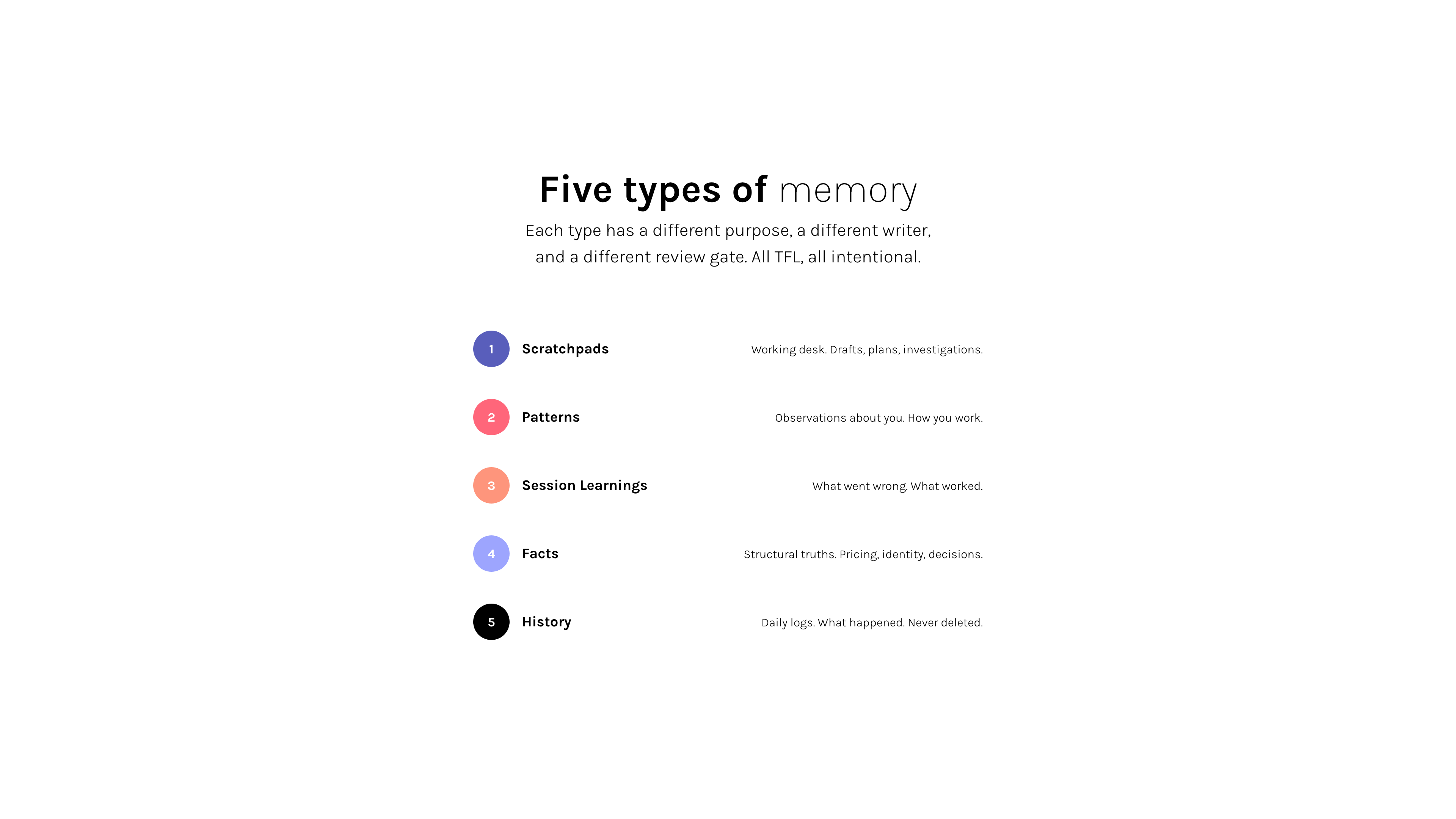
Your root system organizes memory into layers. Each layer has a different purpose, a different writer, and a different review gate. Together, they make sure nothing important is lost while keeping your root system clean and current. (Updated April 13, 2026 to v2.1. If you set up before this date, see the migration note at the bottom of this lesson.)
The working layers (plus history)
context/pad/
You decide when to clean up
context/memory/patterns.md
You decide when to clean up
context/memory/learnings.md
You decide when to clean up
context/memory/fact/
You decide when to clean up
context/history/daily/
Never deleted
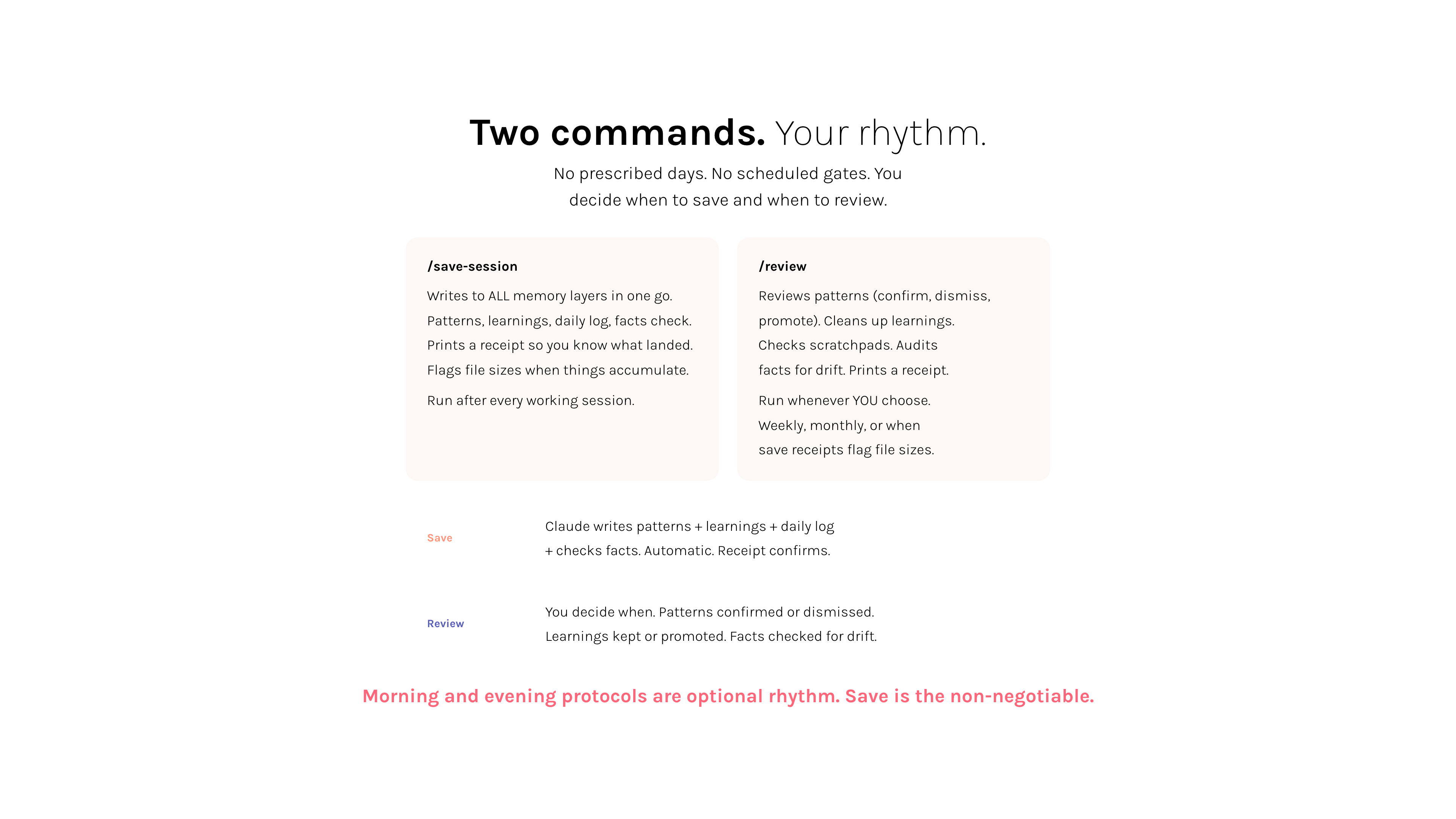
Scratchpads are working notes Claude writes during a session to hold multi-step thinking, build plans, or drafts-before-doing. You do not need to manage them. They live in context/pad/ until you run /review, where you decide together what to keep and what to delete.
Patterns are observations about you. Your wording, choices, emotional tells, repeated phrases, energy shifts. Claude appends one to patterns.md at every save. If nothing came up, it skips silently. When you run /review, Claude mirrors the patterns back to you in neutral observation format. You confirm, dismiss, or promote them to a structural fact. No opinions, no judgement, no coaching. You decide what is real.
From the live session: patterns and depth
How the patterns layer gives your system the ability to notice things about you that a regular chatbot never could. The difference between sycophantic responses and genuine observation.
Session Learnings are operational lessons. Mistakes that happened, things that worked, decisions that were made. Claude appends to learnings.md at each save. When you run /review, Claude shows you accumulated entries and you decide together which to keep, promote, or delete. Nothing gets deleted without your explicit approval. The save receipt flags when the file is getting large.
Facts are structural truths. Your pricing, your methodology, your preferences, your boundaries. They live in context/memory/fact/ as YAML files. Read on demand by skills and by the strategic thinking trigger. Audited when you run /review, or when Claude reads a fact file during a task and flags drift.
History is one file per day. Your immutable record of what happened. Never deleted. Never edited after the fact.
How cleanup actually works
Nothing expires automatically. Claude has no internal clock or timer. It cannot track "this file is N days old" on its own. What keeps the system clean is the review gates built into your morning and evening protocols.
- Every save: Claude appends to
patterns.mdandlearnings.md. This happens automatically as part of/save-session. - You decide when to clean up: Claude walks through your patterns (confirm, dismiss, promote), your learnings (keep, promote, delete), your scratchpads (keep or delete), and your facts (still true?). You decide the rhythm. No prescribed days.
You do not have to remember any of this. The protocol files in .claude/commands/ handle the gates. Your only job at the gates is to answer in plain language: keep, promote, delete, push to next week.
Already on an older version?
If you set up your root system before April 13, 2026, go to the Updates page and download Memory System v2.1. It handles migration from v1.0 or v2.0 automatically. One command, safe to re-run, preserves all your existing data.
Next LessonTeaching it more every day
Every interaction teaches your root system something new. Not because it is recording everything in some hidden database, but because the files in your root system grow and refine with use. The question is not whether it learns. It is how fast.
Daily check-ins
The simplest way to teach your root system is to start each session by telling it how you are. Energy level, what you are working on, what is on your mind. These get logged, and over time your root system builds a picture of your rhythms. You will set these up properly in the next module.
Voice refinement
When Claude writes something that sounds off, tell it. Be specific. The more direct you are, the faster your voice guide sharpens.
Every correction gets saved. After a week of daily use, the difference is real. After a month, Claude writes in your voice without being asked.
Saving your sessions
At the end of a work session, you want to save what happened so your root system remembers it next time. Just say "save" or type /save-session. Claude runs a multi-step save process. Every step is verified. Every failure is visible.
patterns.md as unconfirmed. If nothing came up, it skips silently. No null lines.
learnings.md. Things that went wrong, fixes that worked, technical gotchas worth remembering.
context/history/daily/YYYY/MM/DD.md gets updated with completed items, energy, and notes.
When the save finishes, Claude prints a receipt showing every step as confirmed, skipped, or FAILED. Always check it. If any step says FAILED, tell Claude to retry before you close the session.
What a save receipt looks like
1. Patterns: 2 written
2. Learnings: written
3. Daily log: updated
4. Facts: no updates
5. File health: ⚠ learnings: 215 lines ⚠ 4 pads
6. Git: committed
Your evening protocol (which you set up in Module 3) triggers this full save process automatically. But you can also save mid-session whenever you have done something worth keeping. The word "save" is the trigger. Say it, and the full process runs.
The receipt tells you exactly what landed, what was skipped, and whether your memory files are getting large. When file health shows warnings, that is your natural trigger to run /review and clean up. No scheduled days, no gates to remember.
Reflective practice
Your root system can support whatever grounds you. Journaling, meditation, gratitude practice, prayer, time in nature. You choose what matters. Tell your root system about your practice, and it will prompt you, log your reflections, and track your consistency.
The files your root system writes are stored locally on your computer. But anything you type in a conversation with Claude goes through Anthropic's servers for processing, the same as any other message. If your reflective practice is deeply personal and you want it fully private, write it in a file yourself instead of sharing it in conversation. Your root system can still track consistency and prompt you without reading the content.
If you are tired, say so. If you are avoiding something, say that too. Your root system does not judge. It just learns how to support you better.
Your fact files
Inside your memory system, there is a folder called context/memory/fact/. This is where permanent truths live. Things that do not change session to session. Your name. Your boundaries. How you prefer to work. What you have decided and why.
Your starter kit comes with seven fact file templates, each in YAML format. YAML is just a simple way to store structured information that both you and Claude can read. You do not need to learn any syntax. You fill them in by talking to Claude, and it writes the files for you.
The seven fact files
identity.yaml
Who you are. Your name, your role, your timezone, your location, your core values, how you communicate. This is how Claude knows the person it is working with.
preferences.yaml
How you like things done. Your tools, work hours, morning routine, planning style, writing style, how you want Claude to respond. The more specific you are, the less you need to correct.
constraints.yaml
Your hard limits. Budget, time available, non-negotiables, tools you refuse to use, topics that are off-limits, accessibility needs. These are your guardrails that Claude respects absolutely.
decisions.yaml
Choices you have made and the reasoning behind them. Pricing decisions, platform choices, positioning calls. When Claude knows WHY you decided something, it stops suggesting alternatives you already rejected.
current-state.yaml
Where you are right now. Life phase, business phase, energy level, primary focus, quarterly goals, and what is in your way. This is the only fact file that changes often. It keeps Claude oriented without you explaining your context every session.
personal.yaml
Tendencies and structural truths about how you actually operate, promoted from patterns.md when you confirm them. Starts empty. Grows over time as Claude notices patterns and you say "that's actually a fact about me" during the evening pattern review.
skills-registry.yaml
A catalog of every skill your root system can run. Maps skill names to their purpose so Claude knows what tools are available. This one fills itself as you add skills.
How to fill them in
You do not need to write YAML yourself. Just talk to Claude. Tell it about your business, your preferences, your boundaries. It will organize everything into the right files.
Your setup prompt
Claude will interview you, one file at a time. It asks questions, you answer in plain language, and it writes clean YAML. You review it, approve it, and move to the next file. Most people finish all six in one session.
When fact files actually load
Important: fact files are not loaded into every session automatically. Only your CLAUDE.md and your rules in .claude/rules/ auto-load every session. Fact files are loaded on demand: when a skill references one, when your morning protocol asks for current state, or when Claude hits the strategic thinking trigger (any "what should I do about" question). This is deliberate. It keeps your context window light and lets fact files grow detailed without slowing every conversation down.
ALWAYS LOADED (every session, by Claude Code)
CLAUDE.md (root file)
MEMORY.md (Claude native auto-memory)
.claude/rules/ (all rule files)
LOADED ON DEMAND
learnings.md + patterns.md (by /morning)
Fact files (when a skill needs one)
Skills (when you run them)
Content folders, history (when referenced)
Fact files vs skills: know the difference
Fact files hold your permanent baseline. Things that are true regardless of what you are working on today. Skills hold the detailed instructions for specific tasks. When you run a skill like /content-calendar or /crm, that skill file loads with all of its specific rules and templates. When the task is done, that context goes away.
This means your fact files do not need to contain everything. If your brand guidelines only matter when you are creating content, those details belong in a content skill, not in your fact files. If your CRM rules only matter when you are logging contacts, those belong in your CRM skill. Fact files carry your baseline truth. Skills carry the operating manual for specific work.
From the live session: rules, skills, and keeping files short
How rules (always loaded) differ from skills (loaded on demand), and why shorter files produce more accurate results.
The golden rule: if it does not describe WHO you are or WHAT you have decided, it probably does not belong in a fact file
A good test: if a skill could do its job without reading this line, it probably belongs in the skill instead. Your identity? Fact file. Your brand color hex codes? Skill. Your pricing decisions and the reasoning behind them? Fact file. Your carousel slide template? Skill.
Example: a lean identity.yaml
role: Business strategist for creative solopreneurs
timezone: America/Los_Angeles
values: [depth, honesty, rest]
communication_style: Direct, warm, no corporate speak
Five lines. That is enough for Claude to know who it is working with. Everything else loads when it is needed.
Fact files are the few things you keep on your desk at all times. Skills are the drawers you open when you need something specific. If your desk is covered in papers, there is no room to work. Keep the desk clear. Use the drawers.
Organize your knowledge: the map and the terrain
In Module 1, you brought your existing knowledge into your system. Files, frameworks, client data, notes. Now it is time to organize WHERE everything lives so your root system knows how to find it and when to load it.
This is the difference between having a pile of useful files and having a system that routes to the right information at the right time.
The map vs the terrain
Your root file (CLAUDE.md) is the map. It does not hold all the details. It tells Claude where the details live and when to load them. The terrain is everything else: your fact files, your skills, your rules, your content, your data.
When Claude opens a new session, it reads the map first. From the map, it decides what to load based on what you are doing. If you are writing content, the map points to your voice guide and content skills. If you are managing contacts, the map points to your CRM skill and contact data. The map stays small. The terrain can grow endlessly.
THE MAP (always loaded by Claude Code)
CLAUDE.md (root file)
MEMORY.md (auto-memory)
Rules (.claude/rules/)
Small, lean, points elsewhere
THE TERRAIN (loaded on demand)
learnings.md + patterns.md (by /morning)
Fact files (when a skill needs one)
Skills (.claude/commands/)
Content hub, CRM data
Rich, detailed, loaded when needed
Where each type of knowledge lives
Here is a concrete guide for deciding where to put things. Go through the files you imported in Module 1 and ask: what type of knowledge is this?
CLAUDE.md (your root file)
The routing table. What files exist, where they live, when to load them. Your protocols (what happens when you say "good morning" or "save session"). Your key file locations table. Keep it lean. If it is longer than a few pages, you are putting terrain in the map.
Rules (.claude/rules/)
Non-negotiable instructions that apply EVERY session. Your writing style rules ("never use em dashes"). Your security rules ("never commit API keys"). Your visual design rules. Think of these as your absolutes. Claude loads all rules automatically at the start of every session, so keep them short and universal.
Fact files (context/memory/fact/)
Permanent truths in YAML format. Your identity, preferences, constraints, decisions, current state, personal patterns. Loaded on demand: when a skill needs one, when your morning protocol asks for current state, or when Claude hits the strategic thinking trigger. Keeping them on demand instead of always-on keeps your context window lean.
Skills (.claude/commands/)
Detailed instructions for specific tasks. Your content creation process, your CRM workflow, your morning protocol, your email templates. Skills are loaded ONLY when you run them. A skill can be pages long because it only uses context when it is active.
Four language folders (soul/, mind/, heart/, body/)
Your actual content and data. Frameworks in mind/. Voice guide and content in heart/. Dashboard data in body/. Reflective practice in soul/. Claude navigates here when a task requires it, guided by the map in your root file.
From the live session: how long should the root file be?
The real answer depends on how you use your system. Narrower focus can be longer. Wider use means keeping it short and moving detail into skills.
The sorting exercise
Ask Claude to help you audit where your imported files ended up and whether they are in the right place. This is the prompt that makes the difference:
Your setup prompt
Common mistakes
A well-organized system with 20 files beats a messy system with 200 files. The architecture is the intelligence.
Teaching it your network
From the live session: LinkedIn safety
What to know about LinkedIn's restrictions on AI tools before importing your network. The safe way to do it.
The fastest way to teach your system is to give it real data. Your LinkedIn connections are one of the richest sources you already have. Hundreds or thousands of people you have met, worked with, or connected with over the years. Your root system can read through all of them and tell you who matters most for where you are going.
Export your LinkedIn connections
Go to LinkedIn Settings > Data Privacy > Get a copy of your data > Connections. LinkedIn will email you a CSV file (usually within 10 minutes). Download it and drop it into your project folder.
Let your system classify them
Run /import-linkedin and your root system will read through every connection. It uses the identity and business fact files you filled in during onboarding (Module 1) to figure out who in your network looks like the kind of person you want to work with. Your dream client profile, your industry, your offer. All of that comes from your own files, not from a generic template.
Analyze your network
Then run /network-analysis to get strategic recommendations. Who should you reconnect with? Where are the clusters of aligned people? What patterns show up in your network that you have never noticed?
Go deeper on your best matches
For your strongest matches, run /lead-enrichment to pull more context before you reach out. This gives you something real to say when you reconnect, not a generic "hope you are well" message.
See your data in the dashboard
Your dashboard is ready to show your imported network. Two ways to open it:
Option 1: Ask Claude
Tell Claude: "open my dashboard" or "show me my network data." It will start the local server and open the page for you.
Option 2: Run it yourself
Then open http://localhost:8080 in your browser.
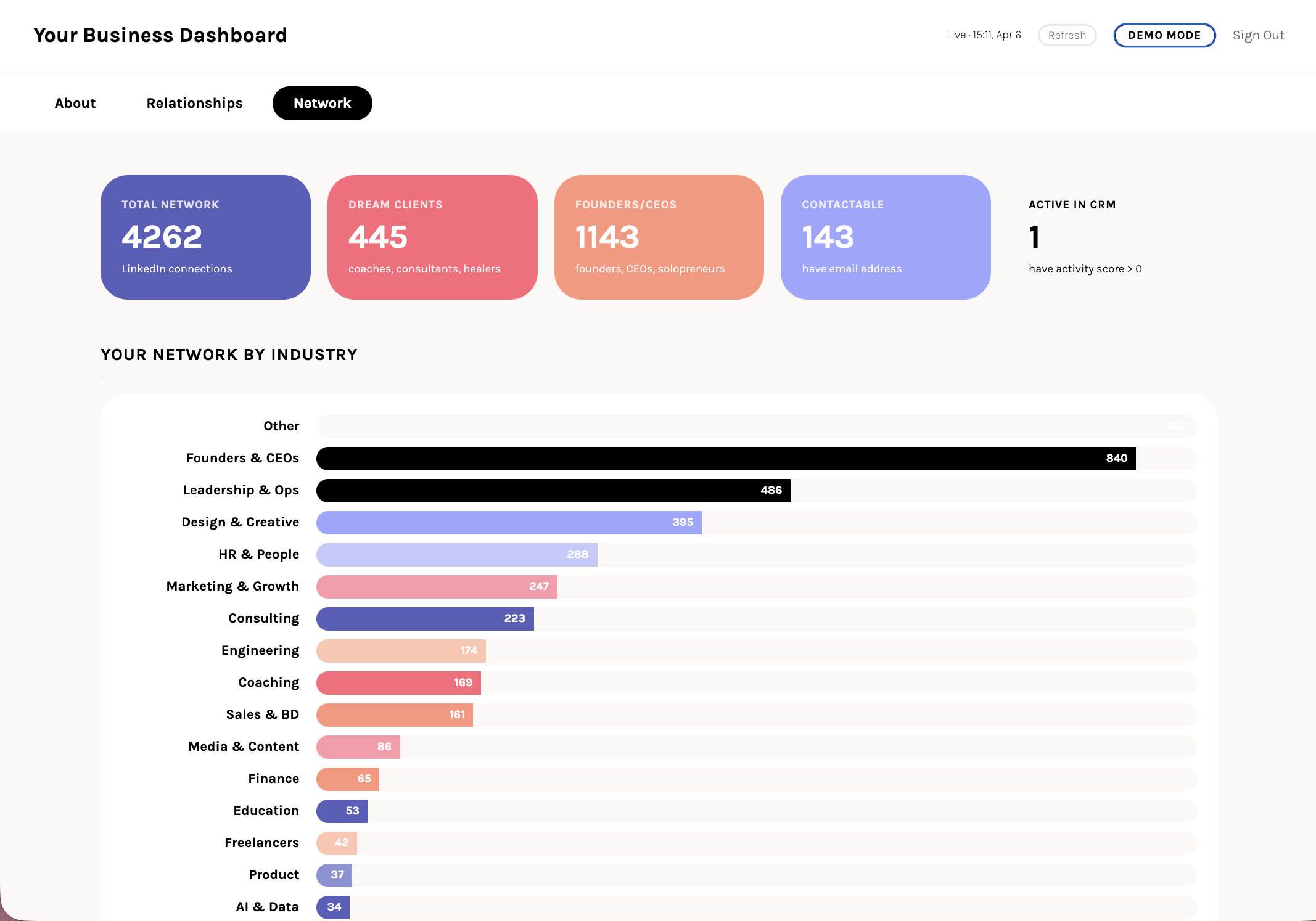
Click the Network tab to see your connections classified by industry and ICP fit.
If your network data does not appear
Your dashboard reads from body/dashboard/data/. If your LinkedIn import saved to a different location, paste this prompt to fix it:
Your Network tab is now live
Every connection is classified based on your own profile, not a generic template. The people who match what you described in your onboarding show up first. This is your network through your lens. The other tabs (Today, Relationships, Inspiration) fill in as you progress through Modules 3 and 4.